VHS Quick Recovery Actions
When VHS Quick Recovery is enabled, the service performs some initial recovery actions automatically. There are some additional steps that may be completed manually to restore data using the VHS Recovery utility.
Note: These steps are optional but are probably desirable.
Automatic Recovery Steps
If the VHS starts up when there has been an abnormal shutdown and Quick Recovery is enabled, Quick Recovery will perform the following steps automatically.
Step 1: "Dirty" Database is Archived
The existing "dirty" history database files are archived off into a subfolder in the VHS data folder. These files will be moved in their "failed" state for potential data recovery using the VHS Recovery utility or further analysis. These files will remain the archive directory indefinitely.
The archive folder will be named QR_DirtyDB_YYYYMMDDhhmmss, where the timestamp suffix is the time that the "dirty" database files were archived.
Step 2: Service Starts with a New Database
The VHS starts up with a blank database. This allows recent data stored on current value service queues to be immediately written to the history service. At this point in the recovery, all services and clients can access the VHS as normal.
Step 3: Service Writes Change Queue Data to the New Database
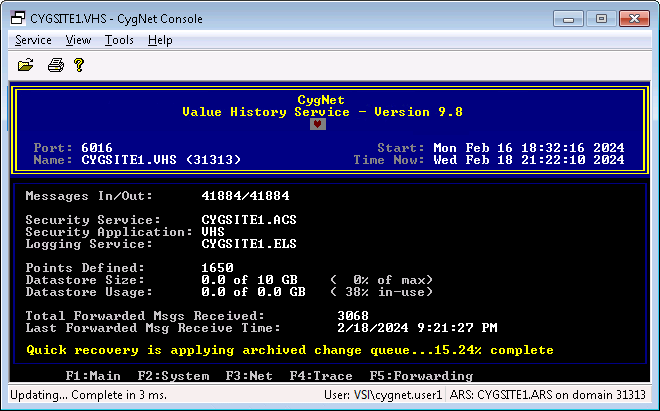
The VHS reads the recently archived "dirty" change queue (VhsChangeQueue.dat) file and populates its database with all the recent changes that had occurred before the abnormal shutdown. Only data that meets the data integrity check will be imported to prevent corrupt changes from being written the new database.
The progress of this step of can be tracked on the VHS screen of CygNet Console or by using a point that monitors the SVMVHSQRPR SVCMON UDC.
|
Quick recovery monitoring |
Manual Recovery Steps
Since VHS Quick Recovery starts the VHS with a new database, it will not contain a majority of the data that was in the database prior to the abnormal shutdown. Additional history data can be manually recovered and imported into the new history database, once the automatic Quick Recovery steps are complete. Sources of additional data are Journal Files, the archived "dirty" database, or backed up history database files. To manually recover additional data and import it into the new database see the VHS Recovery utility.


